Smart SIM Registration Deadline in the Philippines (Updated)

The Smart SIM registration deadline in the Philippines was July 25, 2023, set under the SIM Registration Act (RA 11934). That deadline has passed — unregistered SIMs were deactivated after it — but registration is still required: all new Smart, TNT, and Talk ‘N Text SIMs must be registered before use.
This deadline matters because unregistered SIM cards were deactivated after the cutoff. Once deactivated, you could not call, text, or use mobile data until SIM registration was completed.
This update is important for prepaid users, postpaid users, and people using old SIM cards. If you use a Smart network SIM today, this update is meant for you and your number.
What Is the Smart SIM Registration Deadline PH?
The Smart SIM registration deadline in the Philippines was the last date set by the government for all mobile users to register their SIM cards. This rule comes from RA 11934, which asks every mobile user to register to help stop fraud and protect users. The deadline was the same for both prepaid and postpaid Smart, TNT, and Talk ‘N Text users.
Latest Updated Deadline for Smart SIM Registration
The deadline was extended to July 25, 2023 to give users more time. That date has now passed, and unregistered SIMs were deactivated after it.
Who Needs to Register a Smart SIM?
All users on the Smart network must complete SIM registration to keep their number working. This rule applies to every type of Smart connection, no matter how the SIM is used or how long it has been active.
- Prepaid Smart SIM users who buy load and use calls, texts, or data
- Postpaid Smart SIM users with monthly plans
- TNT users under the Smart network
- Talk ’N Text users under the Smart network
If your SIM connects to the Smart signal, registration is required to avoid service loss.
Are Old Smart SIM Cards Required to Register?
Yes, old Smart SIM cards must be registered. SIM cards bought before the law still need registration. Long active numbers do not get special treatment. If an old SIM stays unregistered, it can stop calls, texts, and data after the deadline.
Do New Smart SIM Cards Need Registration?
Yes, new Smart SIM cards need registration before use. New SIMs cannot work until registration is done. Old SIMs worked before the law, but new SIMs stay inactive until registered.
What Happens If You Miss the Smart SIM Registration Deadline?
An unregistered Smart SIM stopped working after the deadline. Calls, texts, and mobile data were deactivated, and you could lose access to your number and linked services.
Can a Deactivated Smart SIM Be Reactivated?
Reactivation after deactivation is limited and generally not possible once a SIM has been deactivated. Contact Smart customer service at *888 as soon as possible with your ID and SIM details to check, but do not assume the number can be recovered.
How to Register Your Smart SIM Now
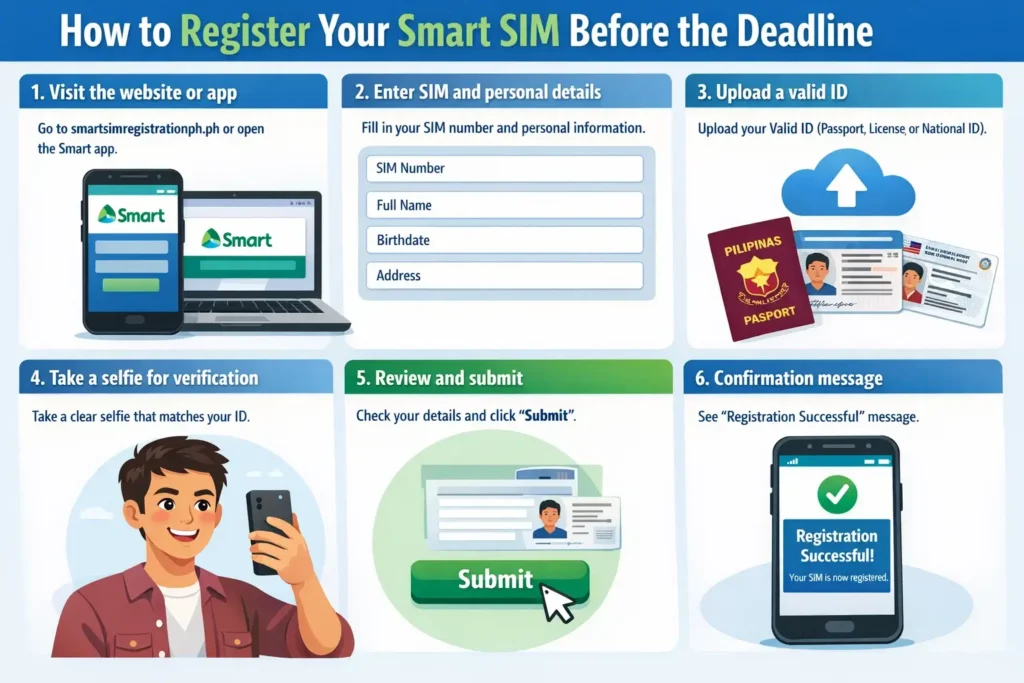
You can register your Smart SIM online or through official Smart channels. The process is simple and usually takes only a few minutes if you have the required information ready. Follow these steps:
- Visit simreg.smart.com.ph using your phone or computer, or use the Smart App (formerly GigaLife)
- Enter your SIM number and personal details (full name, birthdate, address)
- Upload a valid government ID (passport, driver’s license, or national ID). With a National ID, Smart and PSA now verify you in under a minute — enter your name and take a live selfie, with no ID photo upload needed.
- Take a live selfie for verification. For National ID holders, this is a live selfie check against the National ID registry.
- Review the information carefully and submit the registration
- Wait for a confirmation message to ensure your SIM is registered
Documents Required for Smart SIM Registration
- Valid government ID (Passport, Driver’s License, SSS, GSIS, PhilHealth, Voter’s ID, Postal ID)
- Name and photo matching rules – Name on SIM must match ID; photo must be clear and ID current
This ensures your SIM remains active and services continue without interruption.
How to Check Smart SIM Registration Status
You can check your Smart SIM registration status through official channels to make sure your number is active. The easiest way is to visit the How to Check If Smart SIM Is Registered page or use the Smart app and enter your SIM details.
Signs that a SIM is already registered:
- You receive confirmation messages from Smart after registration
- Calls, texts, and mobile data continue to work without interruption
- The system does not ask you to register again when you insert your SIM
Common Problems During Smart SIM Registration
Errors often happen because of unclear IDs or weak internet connection, which can stop registration from completing. Learn more about Smart SIM Registration Errors and how to fix them.
1. Upload Issues
Photos of your ID may be blurry or too large. Take a clear picture or reduce the file size to fix this problem.
2. OTP Delays
The one-time password may arrive late. Make sure your phone has a good signal and wait a few minutes before requesting again.
3. Form Errors
Wrong name, birthdate, or missing information can block registration. Double-check all details before submitting.
These simple steps usually solve most registration problems quickly.
Conclusion
The Smart SIM registration deadline in the Philippines was July 25, 2023, and it has passed. Registration is still crucial for all Smart users — new SIMs must be registered before use.
Registration is quick with a valid ID and correct details. You can check your status online to confirm. Completing registration for a new SIM before use avoids service interruption and ensures your SIM continues working smoothly.
Smart SIM Registration Deadline FAQs
Is Registration Free?
Yes, Smart SIM registration is free. There are no charges for registering online, through the app, or at any Smart store.
Do I Still Need to Register My New SIM Card in 2026?
Yes, all new SIM cards in 2026 must be registered before use. Smart and other providers will not activate the SIM until registration is complete. This applies to prepaid, postpaid, and data SIMs to ensure they are linked to a real user.
How to know if a smart SIM is expired?
A Smart SIM is expired if calls, texts, and mobile data stop working. You can also check its status on the Smart app or official website.
Can I still use my GCash if my SIM is deactivated?
No. If your Smart SIM is deactivated, you cannot use GCash linked to that number. GCash requires an active mobile number for verification, transactions, and security alerts. To continue using GCash, you must reactivate or register your SIM first.